Wednesday, October 4, 2017

HP Inc reportedly discontinuing Windows 10 Elite X3 smartphone in 2019

HP Inc will reportedly discontinue sales and support for its Elite X3 Windows 10 smartphone by the end of 2019.

HP's Europe, Middle East and Asia president Nick Lazaridis told The Register that the company would no longer work on development for Windows' mobile OS, despite having a full roadmap of devices in the works, spelling the end of the line.

"Microsoft, as all companies do, decided on a change in strategy and so they are less focused on what they thought they would be focused on today," Lazardis told The Register.

"Given that, we also had decided that without Microsoft's drive and support there it doesn't make sense. If the software, if the operating system ecosystem isn't there then we are not an operating system company."

An HP Australia spokesperson told CRN: "We will continue to fully support HP Elite X3 customers and partners through 2019 and evaluate our plans with Windows Mobile as Microsoft shares additional roadmap details. Sales of the HP Elite X3 continue and will be limited to inventories in country. HP remains committed to investing in mobility solutions and have some exciting offerings coming in 2018."

HP revealed the Elite X3 in February 2016 as the flagship device supporting Microsoft's Continuum, the technology that allows Windows 10 smartphones to run a full Windows desktop with Universal Apps.

Microsoft even promotes the Elite X3 over its own smartphones in the Microsoft Store. The last Windows 10 smartphone released was the Lumia 950 and 950 XL in 2015, which both supported Contiuum, though they are no longer advertised in the Australian Microsoft Store. The Elite X3 retails for $1099 in Australia.

According to The Register, Lazardis said there was not a large stockpile of devices within the channel, and their sales would be limited to customers with "large bids and opportunities".

A Microsoft spokesperson said: "We will continue to develop Windows 10 Mobile and support Lumia phones such as the Lumia 650, Lumia 950, and Lumia 950 XL as well as devices from our OEM partners."

Updated at 11:38am 5 October to include comment from Microsoft.


Source: HP Inc reportedly discontinuing Windows 10 Elite X3 smartphone in 2019

No phone required: Samsung unleashes a Windows-based VR headset, the HMD Odyssey

6 pictures

Samsung has unveiled the HMD Odyssey, its new VR headset running on the Windows Mixed Reality platform(Credit: Samsung)

View gallery - 6 images

Samsung has already staked out a big slice of the mobile virtual reality pie with the Gear VR, but now the company has announced a new standalone headset, the HMD Odyssey. Ditching the need to slide a phone in there, the Odyssey will be a self-contained system running on the Windows Mixed Reality platform, where it will join devices from the likes of Lenovo and Dell.

Microsoft is positioning the Mixed Reality platform squarely in the center of the VR playing field. The experiences and hardware are more advanced than phone-based devices like the Gear VR or Google's Daydream View, but (for now at least) they won't be as immersive as the high-end, room-scale offerings of the Oculus Rift or HTC Vive.

The other key feature of Windows Mixed Reality is that it's a hardware agnostic system, meaning different companies can release different headsets and accessories that will all run the same software. All the announced headsets have been pure VR devices so far, but the "Mixed Reality" moniker suggests Microsoft might be leaving the door open to eventually integrate augmented reality systems, like its own HoloLens, into the ecosystem.

The Samsung HMD Odyssey looks set to sit at the top of the Mixed Reality food chain. While other headsets from HP, Dell, Lenovo and Acer use LCD screens, Samsung has gone for dual AMOLED displays, which should make for brighter colors and deeper blacks. Each screen measures 3.5 in, creating a combined resolution of 1,440 x 1,600 with a refresh rate of up to 90 Hz. Those specs are all slightly higher than the other Windows headsets, as is the Odyssey's 110-degree field of view.

On the outside, the HMD Odyssey has a built-in microphone and surround-sound headphones, and a Six Degrees of Freedom (6DOF) motion sensor that tracks a wearer's movements from the inside-out. That means that users can move forward and backward, up and down and left and right, as well as tilt and turn their heads in three dimensions, without needing to set up external sensors around the room.

The HMD Odyssey controllers look much like those from other companies, which all seem to be from the Oculus Touch design school. They're small wand-shaped devices with buttons, triggers and thumbsticks, attached to larger rings around the top that allow the headset to track their movement. They have the same 6DOF sensors as the headset and are powered by two AAA batteries.

The Samsung HMD Odyssey will be available November 10 for US$499, which includes the headset and two controllers.

View gallery - 6 images The Samsung HMD Odyssey will be available November 10 for US$499, which includes the headset and two controllers

The Samsung HMD Odyssey will be available November 10 for US$499, which includes the headset and two controllers (Credit: Samsung)

The Samsung HMD Odyssey has dual 3.5-in AMOLED displays, with a resolution of 1440 x 1600

The Samsung HMD Odyssey has dual 3.5-in AMOLED displays, with a resolution of 1440 x 1600 (Credit: Samsung)

The Samsung HMD Odyssey has a built-in microphone and surround-sound headphones

The Samsung HMD Odyssey has a built-in microphone and surround-sound headphones (Credit: Samsung)

The Samsung HMD Odyssey tracks motion in Six Degrees of Freedom from the inside-out,  allowing users to move forward and backward, up and down, left and right, and turn their heads in three dimensions

The Samsung HMD Odyssey tracks motion in Six Degrees of Freedom from the inside-out,  allowing users to move forward and backward, up and down, left and right, and turn their heads in three dimensions (Credit: Samsung)

The Samsung HMD Odyssey controllers track a user's hands inside the virtual world, and look a lot like the Oculus Touch controllers

The Samsung HMD Odyssey controllers track a user's hands inside the virtual world, and look a lot like the Oculus Touch controllers (Credit: Samsung)

Samsung has unveiled the HMD Odyssey, its new VR headset running on the Windows Mixed Reality platform

Samsung has unveiled the HMD Odyssey, its new VR headset running on the Windows Mixed Reality platform (Credit: Samsung)

UPGRADE TO NEW ATLAS PLUS

Our new premium service is backed by 15 years of experience covering science, technology and innovation. New Atlas Plus delivers a visual experience that is cleaner, faster loading and ad free. Join the growing list of Plus subscribers for just US$19 a year.

UPGRADE
Source: No phone required: Samsung unleashes a Windows-based VR headset, the HMD Odyssey

Tuesday, October 3, 2017

It's Still Intel Inside Microsoft's First Cellular PC

Please click "I am not a robot" to continue

Access to this page has been denied because we believe you are using automation tools to browse the website.

This may happen as a result of the following:

  • Javascript is disabled or blocked by an extension (ad blockers for example)
  • Your browser does not support cookies
  • Please make sure that Javascript and cookies are enabled on your browser and that you are not blocking them from loading.

    Reference ID: #73fc6f00-a8c0-11e7-b9ab-f978603ba831


    Source: It's Still Intel Inside Microsoft's First Cellular PC

    Monday, October 2, 2017

    Nokia 8 first impressions: Finally, a premium Nokia smartphone we’ve been waiting for

    Nokia, a brand once synonymous with mobile phones, made a comeback in January this year, courtesy HMD Global, the Finnish firm that develops and markets smartphones and feature phones under the "Nokia" brand name. Ever since the resurrection, it's been a long wait for an Android smartphone that blended Nokia's expertise in design and camera, and specifications that could take on the likes of flagships from Samsung and LG. After wooing the budget market with Nokia 3, Nokia 5 and Nokia 6, HMD Global launched the Nokia 8 in August, the most premium smartphone from the company so far.

    This phone, however, is not just about top-end specifications. It comes loaded with three first-of-its-kind features for Android smartphones: Collaboration with ZEISS optics, Nokia 'OZO Audio' and the 'Dual-Sight' mode. Add to this list the vanilla Android with a promise of regular security and software updates and it'd seem the phone has a lot going for itself. We used the smartphone briefly when it was launched in Delhi on Tuesday, and here are our first impressions.

    First things first: The Nokia 8 is a beautiful smartphone. Never mind that it does not sport the trendy Infinity screen or a higher screen-to-body ratio like other contemporary smartphones. What works for it is its sturdy build and a uniform design with a minimalist approach. The phone does remind us of the older Lumia smartphones, but that's not a negative. It fits well in your palms with all the necessary buttons such as volume rocker and power buttons well within reach. Its capacitive touchbuttons at the bottom bezels for navigation, and a home button in the center that also doubles as the fingerprint scanner, add to the phone's ease of use.

    Perhaps, a rear-facing fingerprint scanner, or a large home button, could have been much easier. The pill-shaped home button does take some time to get accustomed to. If you'd used Nokia 6 in the past, you would have faced the same issue initially.

    Needless to say, the pure Android (it runs Android 7.1.1 Nougat out-of-the-box) seems fluid with absolutely no lag or stutter while shuffling between apps. The stock Android is now finally getting a wide attention by various OEMs. In the last couple of months, a number of phones, including Xiaomi's Android One Mi A1, launched with the pure Android. Lenovo ditched its Vibe UI for a range of its smartphones such as the K8 Note. The Nokia 8 will not only be upgradable to Android 8.0 Oreo but also receive regular security updates, a big pain point for Android users for a long time.

    The Nokia 8 runs on pure Android. (HT Photo)

    The Nokia 8 comes with dual 13-megapixel rear cameras with one sensor for colour and the other for monochrome. Though it does not have a dedicated depth-sensing sensor, it can deliver Bokeh effect (DSLR-like shallow depth-of-field). The camera also has a dedicated button for Bothie, which essentially lets you shoot from both the rear and front cameras simultaneously.

    A preview of the camera interface of the Nokia 8. (HT Photo)

    You can also natively livestream Bothie videos to YouTube, Facebook and other social networking sites. We couldn't spend much time with the phone to draw a conclusion on Bothie. However, unless you are a big fan of gimmicks, take this feature with a pinch of salt. Do you really see yourself using this feature a lot? Yes, it's a good addition, but we have the same feelers for Bothie that we had for Sony's 3D creator on the Xperia XZ1. ALSO READ: Liked Nokia 8's 'Bothie' feature? Try these 3 free apps to mimic the experience

    Go live on Facebook and YouTube directly from the smartphone. (HT Photo)

    With Snapdragon 835 processor and 4GB of RAM under the hood, the Nokia 8 is unlikely to be a slouch. More on that later, after we've had a chance to thoroughly review the device. We are really looking forward to try out the OZO 360-degree sound and the Carl Zeiss camera. With a price tag of Rs 36,999, this phone has a good chance in the premium category where its closest competitors are the OnePlus 5 and Honor 8 Pro, priced at Rs 32,999 and Rs 29,999 respectively.


    Source: Nokia 8 first impressions: Finally, a premium Nokia smartphone we've been waiting for

    Microsoft’s Windows Phone Continuum Could Be Copied by Another Android Company

    Microsoft hasn't invented the idea of turning a phone into a PC with the help of external displays and docks, but the software giant has certainly made it more compelling, not only for buyers across the world, but also for other phone makers.

    Similar to Motorola's Atrix which debuted in 2011, the Lumia 950 and 950 XL launched in October 2015 with Continuum, a feature that allows a phone to double as a PC when connected to a bigger display such as a monitor or a projector. And now the same system is becoming a more widespread feature among Android devices, with giant Samsung itself launching it as DeX for the S8 flagship series.

    But rumor has it that Huawei itself is looking into similar functionality for the upcoming Mate 10 smartphone, though this time features could be brought to another level.

    French website FrAndroid writes that Huawei wants to launch a Continuum-like feature that would work with the majority of docks, which means that the company might not necessarily launch a dock of its own.

    Microsoft believed to have abandoned the project

    The report indicates that Huawei's system could use DisplayPort to connect to a dock and to bigger displays, which could be a problem given that HDMI is currently the most widespread connector for such features.

    Any other specifics are not available for the time being, but it's believed that full details would be shared in just a few days when Huawei takes the wraps off the Mate 10.

    In the case of Continuum, Windows phones require a special dock that makes it possible to connect devices to bigger screens, with Windows 10 Mobile operating system then adapting to the new resolution and allowing the work with a mouse and keyboard – which can also be connected thanks to USB ports available in the same dock.

    In the meantime, however, Microsoft appears to have abandoned the idea of a phone that can double as a PC, with Android makers pushing more aggressively for the adoption of such features.


    Source: Microsoft's Windows Phone Continuum Could Be Copied by Another Android Company

    Sunday, October 1, 2017

    Camera head to head: Lumia 950 vs Sony Xperia XZ Premium

    Matthew writes:

    Astute AAWP readers may recall my previous guest shootout, the Lumia 950 vs the Sony Xperia XA1. The XA1 is Sony's mid-range phone for 2017. Well, I liked the overall phone experience quite a bit with that hardware, and so was hankering for a more "premium" camera experience. Which led me to the coincidentally named Xperia XZ Premium. This is Sony's flagship for 2017.

    Lumia 950 vs Xperia XZ Premium

    Released in June of 2017, the XZ Premium is powered by Qualcomm's newest Snapdragon 835 SoC and 4GB of RAM. The camera module is also Sony's newest, dubbed "Motion Eye". This moniker probably refers to the camera's ability to take 960FPS slow motion video as well as its fancy moving laser focus adjustments. But the sensor itself has some noteworthy features. It is a "stacked memory" chip, with RAM sandwiched in between the CMOS and control circuitry layers for faster processing (which is what allows the aforementioned motion features). The sensor is 19 megapixels and sized at 1/2.3", and with a f/2.0 aperture 25mm lens. This means that the XZ Premium has larger pixels than Sony's prior mobile cameras, with fewer pixels occupying the same space. Will this lead to improved low-light performance? We shall see. It will again do battle with the Lumia 950's 20-megapixel sensor, sized at 1/2.4", with a f/1.9 aperture 26mm lens. The Lumia 950 has physical Optical Ima ge Stabilization, while the XZ Premium does not, opting again for Qualcomm's digital "EIS" solution instead.

    So let's start snapping and pit the results against each other, using the Famed Interactive Comparator (FIC, as no one ever calls it!) All shots were taken on auto settings at full resolution, and cropped to 900x500 for close up "pixel peeping" comparisons.

    Note that the interactive comparator below uses javascript and does need to load each pair of images. Please be patient while this page loads, if you see a pair of images above each other than you've either not waited long enough or your browser isn't capable enough! You ideally need a powerful, large-screened tablet or a proper laptop or desktop. This comparator may not work in some browsers. Sorry about that. On Windows 10 Mobile, use the 'AAWP Universal' UWP app, which handles the comparator very competently (see the tips in the app's help screens). TEST 1: STILL LIFE WITH GOOD INDOOR LIGHT

    I enjoyed creating a still life on my kitchen counter for my last shootout, so I did again here. Here is the whole scene, as presented by the Lumia 950:

    Overall scene

    In case you want to grab the original images to do your own analysis, here they are, from the Lumia 950 and Xperia XZ Premium, click the links to download. And to look at the images in more detail, here are fairly central 1:1 crops, just wait to make sure the page has fully loaded and then use your mouse or trackpad pointer to compare the images:

    The 950 ekes out just a bit more detail in the shot overall. You can see differences in the dollar bills and in the grill of the blue toy car. But both cameras do a very good job overall. The Lumia 950 renders everything with a warmer tone, which in fact is a bit too warm compared to the real scene to my eyes. The XZ Premium image has a bit more digital noise. This isn't necessarily all bad, as it does render detail such as the glittery flecks on the green car. But I think this one goes to the 950 by a nose.

    Lumia 950: 9 pts; Sony XZP: 8 pts

    TEST 2: INDOOR MONEY MACRO

    I decided to again get closer to the highly detailed paper currency in order to text detail levels. Here is the whole scene, as presented by the Lumia 950:

    Overall scene

    In case you want to grab the original images to do your own analysis, here they are, from the Lumia 950 and Xperia XZ Premium, click the links to download. And to look at the images in more detail, here are fairly central 1:1 crops, just wait to make sure the page has fully loaded and then use your mouse or trackpad pointer to compare the images:

    This one seems like a complete wash to me. The 950 and the XZ Premium both deliver tremendous detail in the portrait images, and while the XZ Premium shot does a bit better with the delicate cross-hatching on the "white" background of the top bill, the 950 better renders the color difference on the bronze "bell." I think these images are different but evenly matched for quality.

    Lumia 950: 9 pts; Sony XZP: 9 pts

    TEST 3: DAYLIGHT OCEAN SCENE

    I purchased the XZ Premium just before embarking on a brief vacation to the Atlantic coast of the US State of Maine. I took a bunch of shots on the rocky beach, including this one of a fisherman casting off of a rocky wave break. Here is the whole scene, as presented by the Lumia 950, and rotated to fit here, but you'll get the idea from the crops and the downloaded JPGs:

    Overall scene

    In case you want to grab the original images to do your own analysis, here they are, from the Lumia 950 and Xperia XZ Premium, click the links to download. And to look at the images in more detail, here are fairly central 1:1 crops, just wait to make sure the page has fully loaded and then use your mouse or trackpad pointer to compare the images:

    The 950, as per usual, renders things far too warmly. The XZ Premium's color reflects better what I saw with my eyes. Level of detail on the rocks and the fisherman is even. I do think the 950 does a slightly better job on the distant ocean waves, with the XZ Premium's shot looking just a tad noisy in those regions. All told, these are both superior shots (if I do say so myself) taken in ideal smartphone conditions. But detail is detail, and the 950 takes it by a nose yet again.

    Lumia 950: 10 pts; Sony XZP: 9 pts

    TEST 4: DAYLIGHT BERRY MACRO

    For an outdoor macro shot, I found some berry plants just a bit inland from the ocean. Here is the whole scene, as presented by the Lumia 950, and rotated to fit here, but you'll get the idea from the crops and the downloaded JPGs:

    Overall scene

    In case you want to grab the original images to do your own analysis, here they are, from the Lumia 950 and Xperia XZ Premium, click the links to download. And to look at the images in more detail, here are fairly central 1:1 crops, just wait to make sure the page has fully loaded and then use your mouse or trackpad pointer to compare the images:

    This is an interesting case of two phones with different software approaches. Is one better? It's hard to say, as again these are ideal conditions. The blurred "Bokeh" effect on the surrounding foliage is a bit digital on the XZ Premium, indicating some digital sharpening. But I can't really object to the berries themselves, as there is some stunning detail on the individual fuzzy berry stems. The 950 renders the surrounding leaves in a less noisy way, but also doesn't deliver as much detail in the central area of the shot. Both are highly pleasing shots when viewed in total, and only "pixel peeping" makes these differences apparent.

    Lumia 950: 9 pts; Sony XZP: 8 pts

    TEST 5: CEMETERY STATUE, DAPPLED LIGHTING

    All right, let's stop messing around on the easy stuff. Seeking a more challenging scene, I shot in a shady cemetery in the Boston area loaded with famous old dead people. Here is the whole scene, as presented by the Lumia 950, and rotated to fit here, but you'll get the idea from the crops and the downloaded JPGs:

    Overall scene

    In case you want to grab the original images to do your own analysis, here they are, from the Lumia 950 and Xperia XZ Premium, click the links to download. And to look at the images in more detail, here are fairly central 1:1 crops, just wait to make sure the page has fully loaded and then use your mouse or trackpad pointer to compare the images:

    The color rendering on these shots was surprising to me. Instead of veering warm, here the 950 delivers a cooler shot than the XZ Premium! Which, I hate to say, is still wrong – in this case, the real world scene was richer with brown and yellow shades, as the XZ Premium renders it. Interestingly, the 950 had a tough time nailing the focus on the statue as well – this was the best of at least 5 shots I took, kneeling with the cameras stabilized on my knee. The XZ Premium really nails it here, with tight focus and accurate colors. Even the surrounding tree leaves look a bit better, which is typically a strength of the Lumia line and a weakness for Sony. The XZ Premium renders crisper detail on the stone monument, with easier to read writing. There is just a bit of noise which is only evident at "pixel peeping" distances.

    Lumia 950: 8 pts; Sony XZP: 9 pts

    TEST 6: RESTAURANT EXTERIOR AT NIGHT

    Three straight days of lobster dinners had me in the mood for meat and potatoes upon my return to Chicago. So I headed to a venerable German establishment, Laschet's, for a late evening meal. Here is the whole scene, as presented by the Lumia 950, and rotated to fit here, but you'll get the idea from the crops and the downloaded JPGs:

    Overall scene

    In case you want to grab the original images to do your own analysis, here they are, from the Lumia 950 and Xperia XZ Premium, click the links to download. And to look at the images in more detail, here are fairly central 1:1 crops, just wait to make sure the page has fully loaded and then use your mouse or trackpad pointer to compare the images:

    I stabilized both phones on the side of a tree to give both cameras their best possible chance with this difficult night shot. The 950 has an admirable dynamic range, showing detail on the bright elements of the shot like the yellow sign and the light sconces without washing them out. But you know what? For a smartphone camera lacking OIS, the XZ Premium does a surprisingly good job, almost keeping pace with the level of detail on things like the table umbrella, the neon "Stiegl" sign in the window. The 950 wins it, but not in a runaway fashion.

    Lumia 950: 8 pts; Sony XZP: 7 pts

    TEST 7: BRATWURST PLATE

    For better or worse, restaurant food macros are a fixture of smartphone photography. But in dim light, as I had inside Laschet's, getting a good snap can be a challenge. Here is the whole scene, as presented by the Lumia 950, and rotated to fit here, but you'll get the idea from the crops and the downloaded JPGs:

    Overall scene

    In case you want to grab the original images to do your own analysis, here they are, from the Lumia 950 and Xperia XZ Premium, click the links to download. And to look at the images in more detail, here are fairly central 1:1 crops, just wait to make sure the page has fully loaded and then use your mouse or trackpad pointer to compare the images:

    Knowing that the XZ Premium lacks OIS, I braced each camera on the table in front of my plate of bratwurst, sauerkraut, and potato salad. It should be obvious from the shots that the XZ Premium features better contrast and color, with the 950 appearing a tad washed out. Both show admirable detail for such tough lighting. The 950's shot is less noisy, and as such has slightly more detail on small areas like the glass label. But the XZ Premium renders the food better, so I think overall this is a wash. Is all of this starting to sound familiar?

    Lumia 950: 7 pts; Sony XZP: 7 pts

    TEST 8: CHICAGO RIVER AT NIGHT, SHOT FROM TRAIN WINDOW

    This one is really interesting, and was by far the greatest challenge for each camera – shooting from a moving train into a night-time scene with little light. Here is the whole scene, as presented by the Lumia 950:

    Overall scene

    In case you want to grab the original images to do your own analysis, here they are, from the Lumia 950 and Xperia XZ Premium, click the links to download. And to look at the images in more detail, here are fairly central 1:1 crops, just wait to make sure the page has fully loaded and then use your mouse or trackpad pointer to compare the images:

    Both cameras struggled with focus, given the low overall light available. Both phones were braced on the bottom rim of the train window, pressed up against the glass so as to avoid undue reflections. Both phones took ten or more shots as my train crossed the bridge, and at least 7 from each were unacceptably blurry. But I was able to get pretty good shots from this vantage point with both. As you can see from the people and cars in the image, these shots were taken within a half second of each other. I was really surprised how much better the XZ Premium captured fine detail in such dark conditions. Look at the lighted signs and clocks on the buildings! Contrast was also excellent, rendering the water an inky black, which is how it appeared to the eye. This was the best shot from both phones by a fair margin.

    The 950 shot is much brighter, indicating to me that something is going on in software. Overall focus is mushy, and the various lighted signs are mostly illegible. Please do check out the whole shots, as the level of detail across the frame is really remarkable from the XZ Premium. This one shocked me, but I think the XZ Premium is the pretty clear winner.

    Lumia 950: 6 pts; Sony XZP: 8 pts

    TEST 9: CHICAGO THEATER

    Another tough shot, of a brightly lit sign at night. Here is the whole scene, as presented by the Lumia 950, and rotated to fit here, but you'll get the idea from the crops and the downloaded JPGs:

    Overall scene

    In case you want to grab the original images to do your own analysis, here they are, from the Lumia 950 and Xperia XZ Premium, click the links to download. And to look at the images in more detail, here are fairly central 1:1 crops, just wait to make sure the page has fully loaded and then use your mouse or trackpad pointer to compare the images:

    Again I braced each camera on a lamp post in order to give each one its best shot. The 950 excels yet again with dynamic range. Looking at the areas around the tiny light bulbs in the sign, there is an indication of the shadow behind each bulb. The XZ Premium renders each bulb as a more uniform colored light. With that said, check out the round stained glass window at the center of the building. The XZ Premium does a really admirable job of pulling out good, contrasty detail. Below the marquee, the cars and people are similar in terms of level of detail, with the 950 rendering things more smoothly, the XZ Premium more noisily. Both are excellent shots in difficult conditions, though, and I have a hard time assigning the win to one over the other, because they have differing strengths.

    Lumia 950: 7 pts; Sony XZP: 7 pts

    TEST 10: SIMULATED PARTY SHOT, LOW LIGHT WITH FLASH

    Ah, the venerable "simulated party" shot, a real torture test for smartphones. Here is the whole scene, as presented by the Lumia 950, and rotated to fit here, but you'll get the idea from the crops and the downloaded JPGs:

    Overall scene

    In case you want to grab the original images to do your own analysis, here they are, from the Lumia 950 and Xperia XZ Premium, click the links to download. And to look at the images in more detail, here are fairly central 1:1 crops, just wait to make sure the page has fully loaded and then use your mouse or trackpad pointer to compare the images:

    These shots were taken handheld on automatic setting, with flash enabled. Both shots look pretty bad, as expected. The XZ Premium shot washes me out significantly (which is saying something), and the contrast level and digital noise on my face ends up looking rather cartoonish at pixel peeping distances. With that said, the XZ Premium did a far better job over ten straight shots of freezing motion (check out the beer bottle), despite having only one LED to the 950's three. Weird! The 950's shot had better coloration and detail (as in the framed photo in the background, taken with my beloved 1020), with the exception of the aforementioned moving beer bottle label. And so I give this one to the 950 by a nose, beer label notwithstanding.

    Lumia 950: 5 pts; Sony XZP: 4 pts

    VERDICT

  • Lumia 950: 78/100pts
  • Sony XZ Premium: 76/100pts
  • The XZ Premium came much closer to the 950 than its midrange stable mate the XA1 did. Despite lacking OIS, it delivered consistently better contrast and color than the 950. At social media viewing distances, this would probably make the XZ Premium the winner to most eyes. The 950 excels at dynamic range and post processing, which means that upon very close inspection, photos will often look just slightly better than the XZ Premium. Sony's penchant for digital noise and aggressive sharpening has been tamed to a noticeable degree, but it still remains and could be improved further.

    When all is said and done, I think the XZ Premium performs like a flagship, as does the 950. I really pushed these cameras, and they both struggled where even the best small-lensed smartphone cameras frequently fall down. But Sony's larger pixels helped it stay in the race, I think.

    This is the first camera phone in my arsenal that makes me feel OK leaving the 950 on the shelf. Apple's iPhone 7, Huawei's Honor 5X, and Sony's Xperia XA1 all failed to get this close. But the XZ Premium, with its superior CPU horsepower, slow motion and 4K video capabilities, and full-bodied Android ecosystem (albeit running the W10M-style Square Home 2 app launcher, as shown below) is definitely a better all-around smartphone, even if the camera is very slightly outclassed.

    And so I consider myself entirely jumped from the W10M ship onto the SS Android. I'll be sticking with the XZ Premium as my daily driver for the long haul. I'll be looking with interest at what Microsoft cooks up with its Surface/Andromeda/Rainbow Unicorn projects (I made that last one up!), but I have my doubts that they will even try to reclaim their now dusty imaging crown from current competitors.

    Matthew Weflen


    Source: Camera head to head: Lumia 950 vs Sony Xperia XZ Premium

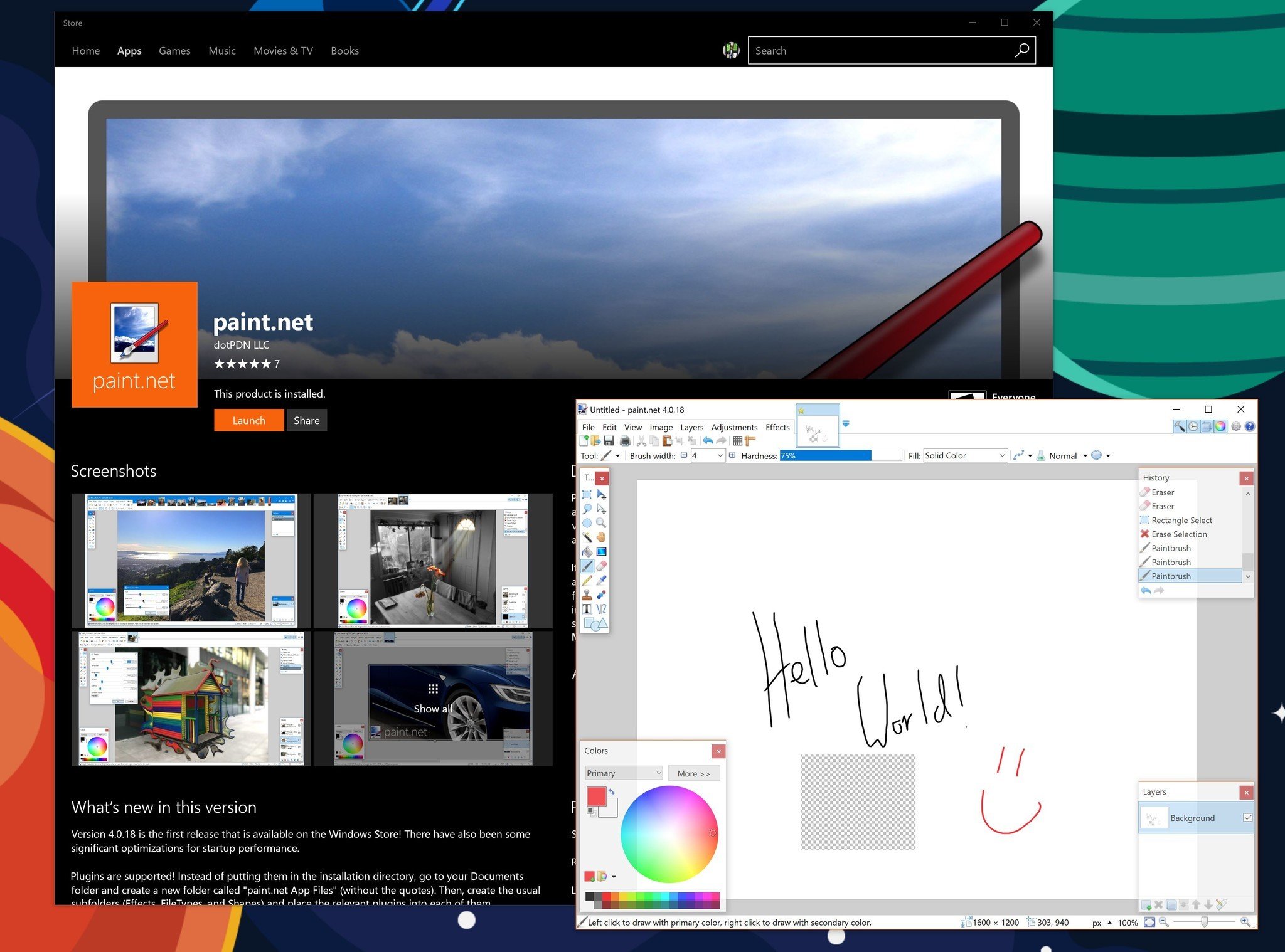
    Paint.NET is now available in the Windows Store for all Windows 10 PCs

    Legendary old school drawing app Paint.NET arrives in the Windows Store through Microsoft's Desktop Bridge.

    Back in late June, we reported that Ricker Brewster – the current caretaker and developer behind Paint.NET, which first launched in 2004 – was going to put into the Windows Store using Microsoft's win32 conversion system "Project Centennial." Just a few months later (due to some travel and other business) the app is finally here.

    Paint.NET is now ready to download to any Windows 10 PC with a free trial option (spotted by Aggiornamenti Lumia). There is also a discounted price of $5.99 for the app, which is a saving from the regular $8.99 price tag. That sale runs through all of October. The price is thought more of as a donation to support the app's continued development although users can use the app with the free trial method instead.

    If you buy Paint.NET in the Windows Store, you'll be supporting its development directly (normally we ask for a donation). You will get the convenience of fast, easy installation onto all of your Windows devices along with fully automatic, behind-the-scenes updates with all the newest features, improvements, and fixes.

    Fans of MS Paint who always wanted something more powerful gravitated to Paint.NET's significantly stronger tool support, which merged some advanced features found in Adobe Photoshop with the MS Paint app aesthetic.

    It started development as an undergraduate college senior design project mentored by Microsoft and is now maintained and developed by Rick Brewster. Originally intended as a free replacement for the Microsoft Paint software that comes with Windows, it has grown into a powerful yet simple image and photo editor tool. It has been compared to other digital photo editing software packages such as Adobe Photoshop, Corel Paint Shop Pro, Microsoft Photo Editor, and The GIMP.

    The version launched in the Windows Store is 4.0.18 with "some significant optimizations for startup performance." Additionally, from the release notes:

    Plugins are supported! Instead of putting them in the installation directory, go to your Documents folder and create a new folder called "paint.net App Files" (without the quotes). Then, create the usual subfolders (Effects, FileTypes, and Shapes) and place the relevant plugins into each of them.

    Getting Paint.NET into the Windows Store is a huge win for Microsoft who is pushing the Desktop Bridge as a method for developers to get wider and easier app distribution to the 500 million Windows 10 users.

    While getting Spotify (and soon Apple iTunes) in the Store is significant, getting these older but familiar apps too is just as important. Being in the Store, users can expect automatic app updates instead of having to go through the Paint.NET website.

    Grab Paint.NET for your Windows 10 PC now from the Store and maybe throw the developer that donation to show support. (And yes, we verified it works with Windows 10 S machines too).

    See in the Windows Store

    Thanks, Simon, for the tip!


    Source: Paint.NET is now available in the Windows Store for all Windows 10 PCs